How guests opt in to texts
Quick Gallery texts event guests who ask for it about their place in the photographer’s line. This page shows what we send, how often, and exactly where and how guests give consent.
The program
- Program name: Quick Gallery line alerts.
- Who sends it: Quick Gallery, from our toll-free number, on behalf of the photographer running the event (for example, a studio taking Santa photos or mini sessions). Every text starts with the photographer’s studio name.
- Who gets it: only guests who tick “Text me when it’s my turn (and a thank-you after)” and enter their mobile number when they join the line or book a time.
- What it’s for: letting a guest know when it’s their turn, so they can wait somewhere else instead of standing in line, and thanking them after their session when the photographer delivers photos through their own gallery service. No marketing or promotional messages. Links and emoji are removed from the wording automatically.
The messages
There are three kinds of text in use today, and a fourth, the reminder, that we’ll send only once it’s enabled. Photographers can reword the middle of each one, but every text starts with their studio name and ends with “Reply STOP to opt out.”, and each fits in one 160-character message.
1. “You’re up next”
Sent automatically, once per visit, when the guest gets near the front of the line (3rd in line by default; the photographer can choose). Default wording:
Harper Lane Photography: You're up next. Please head to the photo booth now. Reply STOP to opt out.
2. “Ask to come up now”
Sent by the photographer when they’re running ahead, to a guest waiting in line and sometimes the next one or two behind them. Default choices:
Harper Lane Photography: We're running ahead. Come on up to the photo booth now. Reply STOP to opt out.
Harper Lane Photography: You're next. Please head to the photo booth. Reply STOP to opt out.
3. Thank you
Sent once, after the guest’s session is completed, only on events where the photographer delivers photos through their own gallery service (Pixieset, ShootProof and the like). It carries the photographer’s own thank-you message when it fits one text with no links; otherwise the default:
Harper Lane Photography: Thanks for coming. Harper Lane Photography will send your photos soon. Reply STOP to opt out.
4. Reminder before a booked session
Sent once, before a booked time, to guests who booked ahead and ticked “Text me a reminder before my session” (the photographer chooses 1, 2 or 3 hours before, or the day before). The wording is fixed:
Harper Lane Photography: Reminder: your session is today at 10:20 AM. Reply STOP to opt out.
Harper Lane Photography: Reminder: your session is tomorrow at 10:20 AM. Reply STOP to opt out.
Photographers can also send a test text to their own mobile number from their settings, to see how a message looks.
How often
- Message frequency varies, usually 1 to 4 texts per visit, all about that visit: a reminder before a booked time, their place in line, and a thank-you after.
- Line texts stop when the guest’s session starts; the only text after that is the thank-you. A guest who comes back for another event has to opt in again.
- Message and data rates may apply.
Opting out and help
- Reply STOP at any time to stop texts. No more texts are sent to that number from our number.
- Reply HELP for help, or email hello@quickgallery.app.
- Guests still see the alerts on their waiting page, and by email if they gave one, so opting out of texts never costs them their place.
- Carriers are not liable for delayed or undelivered messages.
Where guests opt in
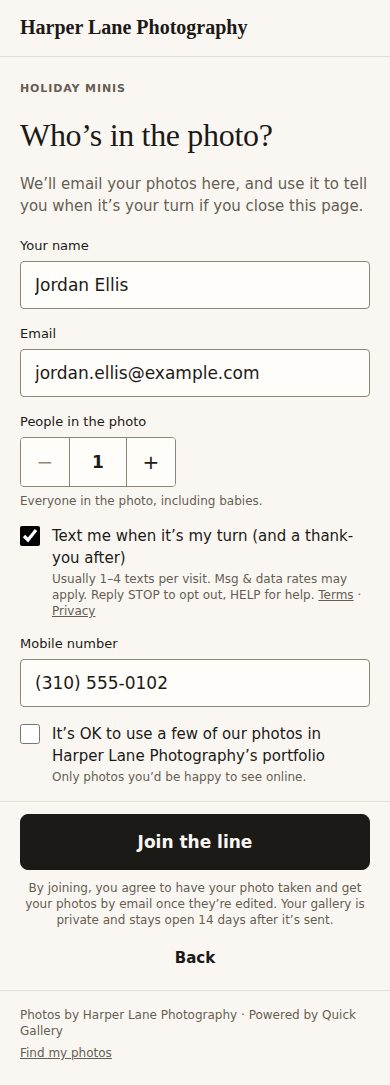
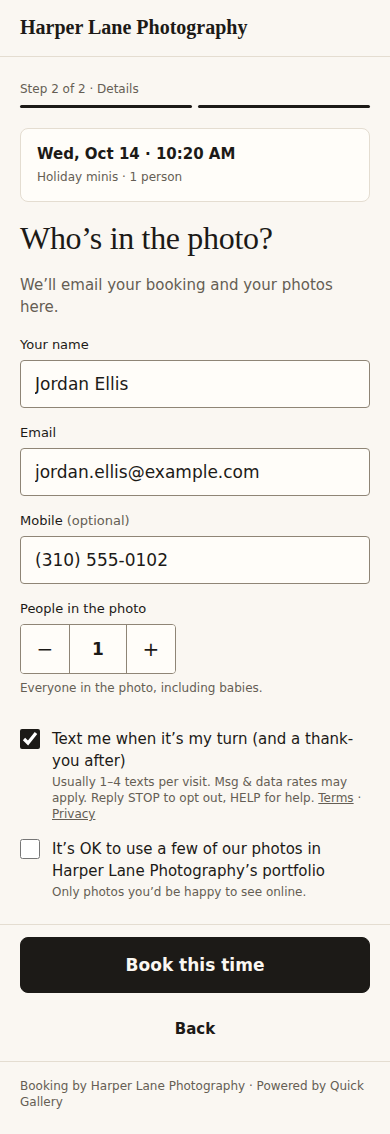
Guests join the photographer’s line on a web page, either by scanning a QR code at the event or by booking a time ahead. Both forms have the same checkbox, “Text me when it’s my turn (and a thank-you after),” which is unticked by default. Once reminders are enabled, the booking form’s checkbox names the reminder too: “Text me a reminder before my session and when it’s my turn”, or “Text me a reminder before my session (and a thank-you after)” when the event has no line texts. Guests can join the line without it. Ticking it asks for their mobile number, and the disclosure beside it says what they’ll get, that message and data rates may apply, and how to reply STOP or HELP, with links to our Terms and Privacy Policy.
The disclosure reads: “Usually 1–4 texts per visit. Msg & data rates may apply. Reply STOP to opt out, HELP for help. Terms · Privacy”.
1. Joining the line at the event (scan the QR code)
2. Booking a time ahead
Privacy
- No mobile information will be shared with third parties or affiliates for marketing or promotional purposes. Text messaging opt-in data and consent are never shared with any third party.
- Numbers are used only to send these alerts, through our text message provider, Twilio.
- Terms of Service: Text message alerts
- Privacy Policy: Text messages
Questions: hello@quickgallery.app