


Quick Gallery Join the beta

Mini-session and event workflow for photographers, by photographers

The whole mini-session day,
in one place.

From booking to delivery, one smooth workflow.

Free during the beta. Then $25/month, or $240/year.

$25/month, or $240/year. Cancel anytime.

Now with an iPhone app and Apple Watch app
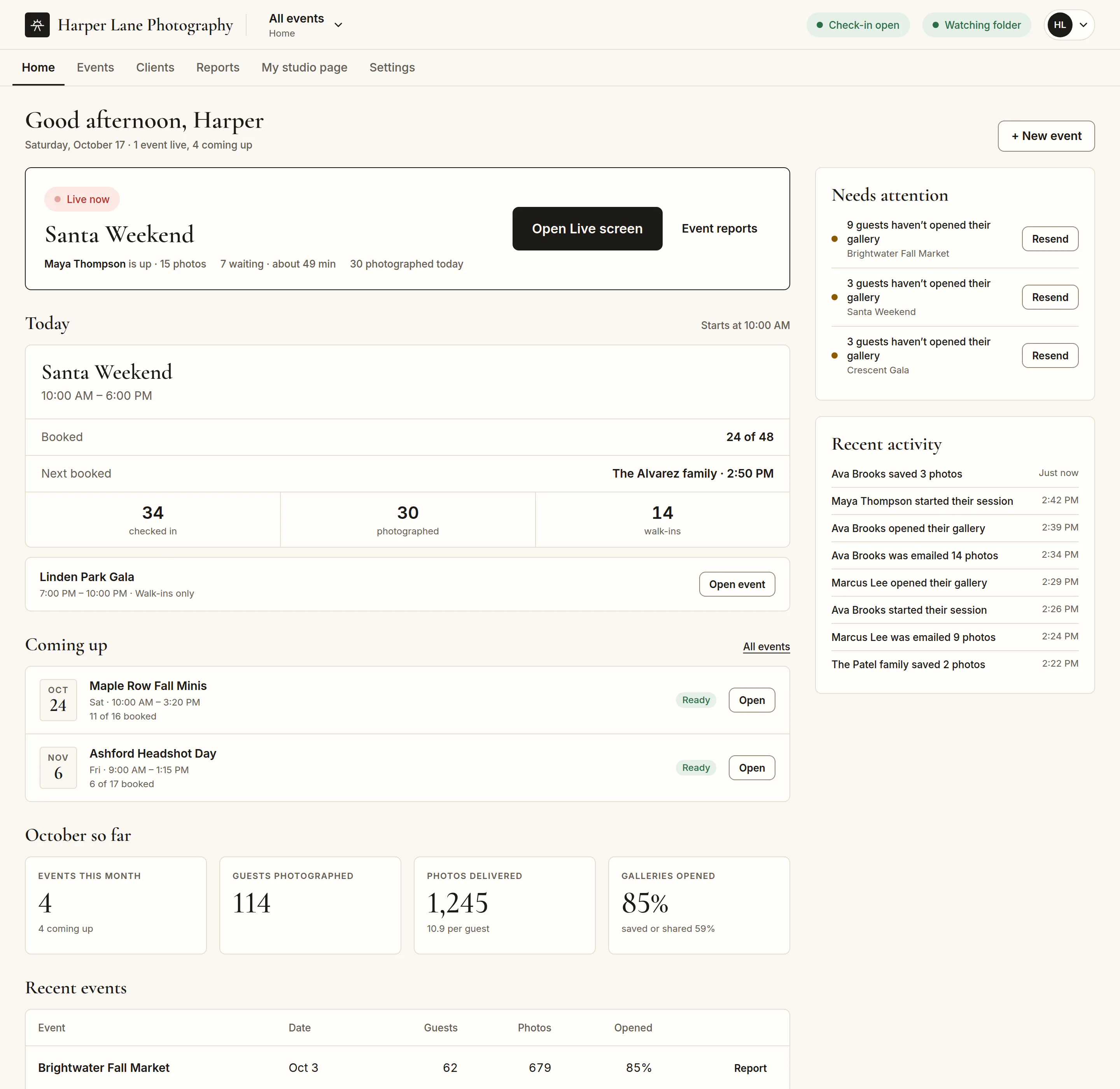
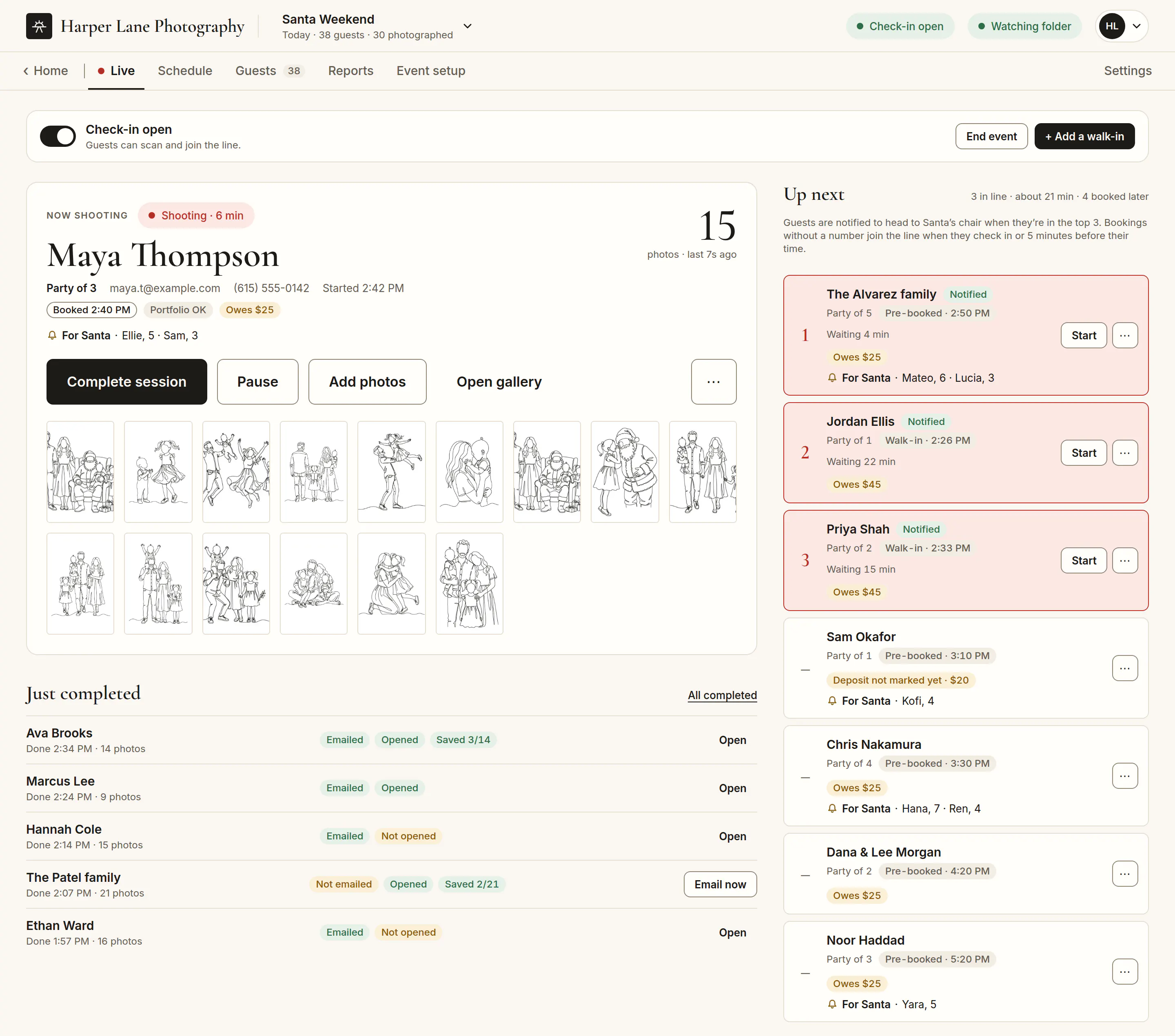
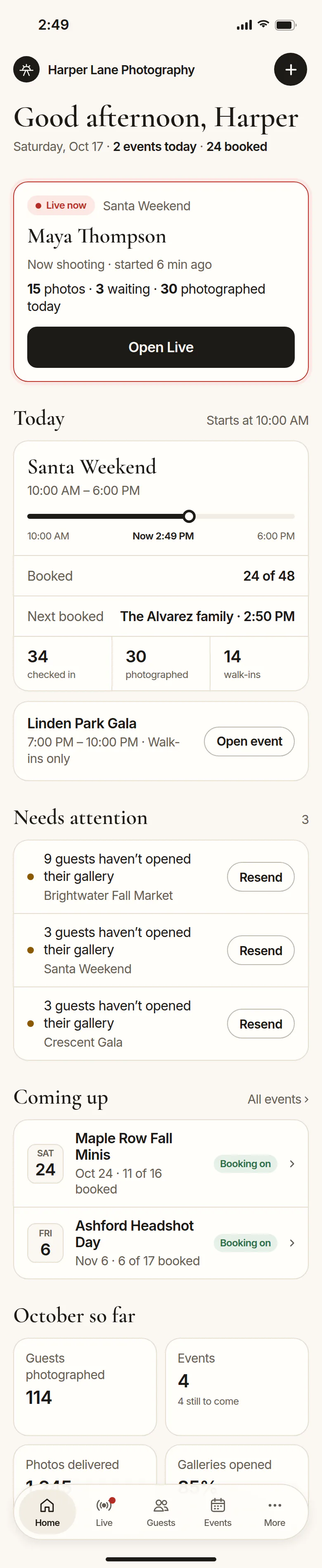
The Quick Gallery dashboard Home for Harper Lane Photography: the live event, what’s coming up, what needs attention and the month so far
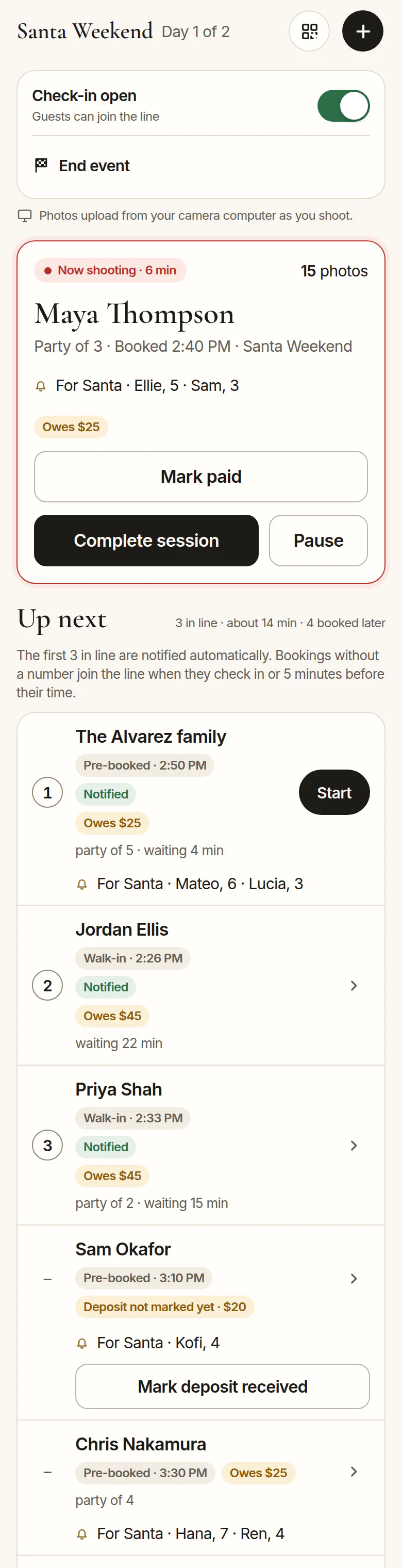
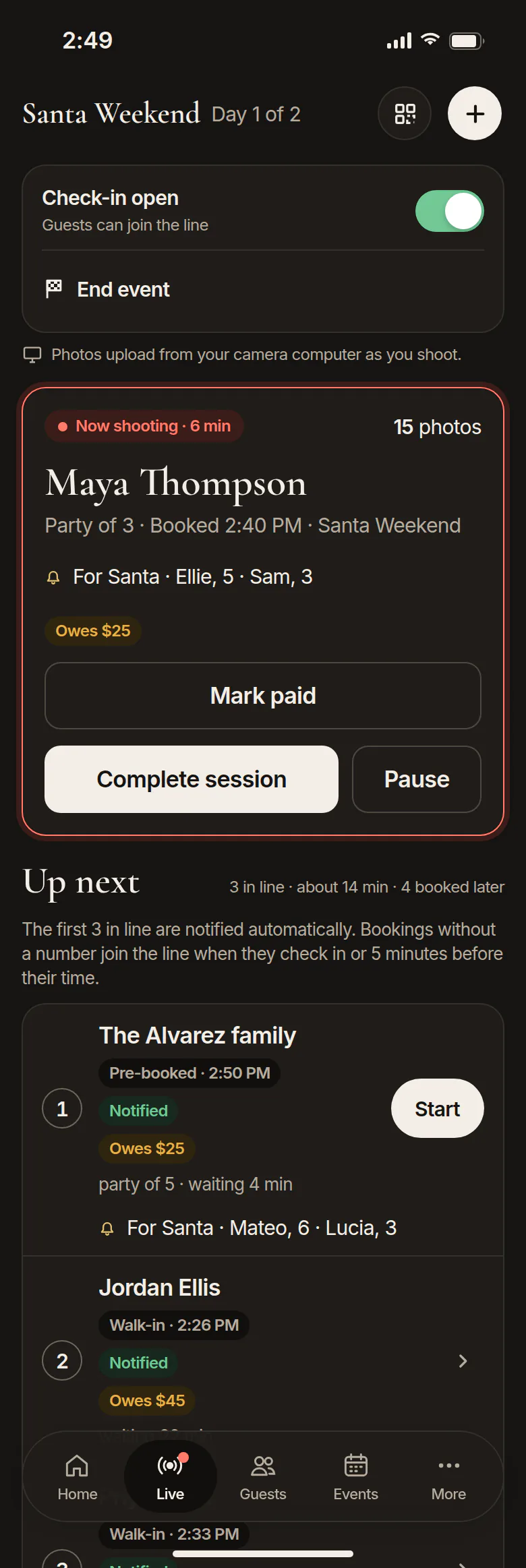
The iPhone app’s Live screen: who you’re shooting, owed amounts and who’s up next
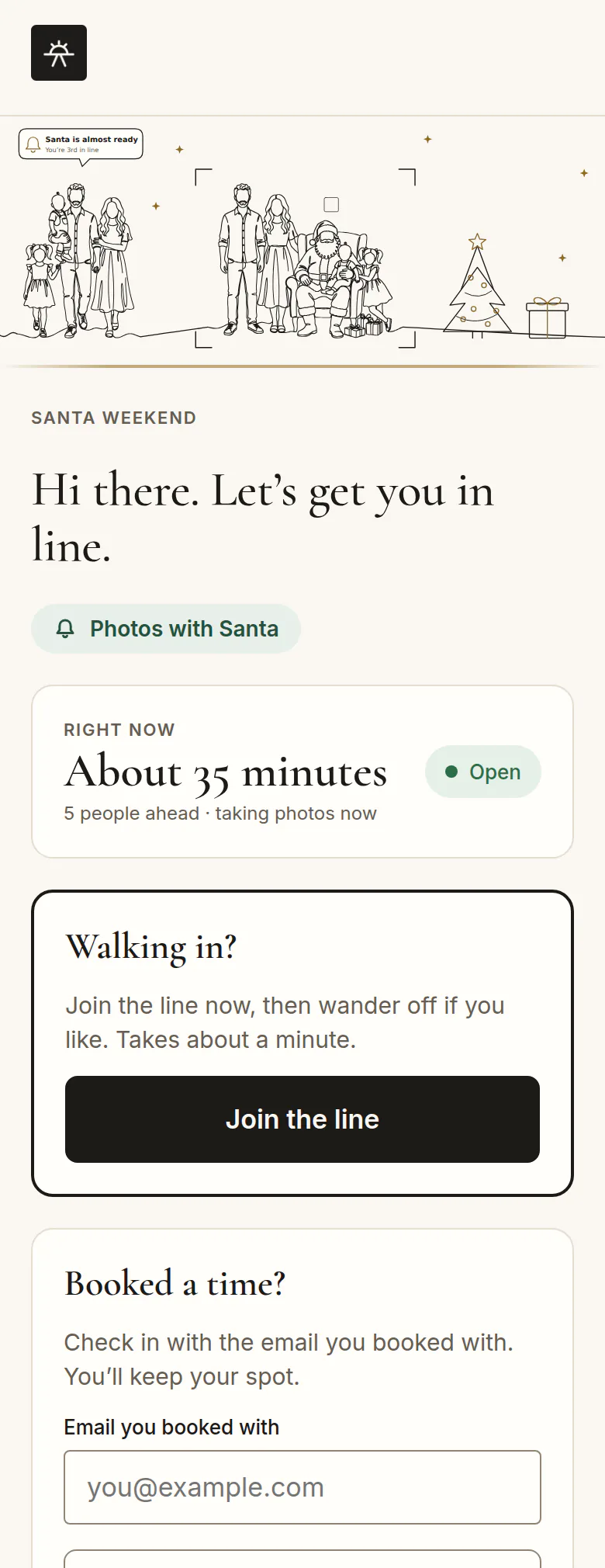
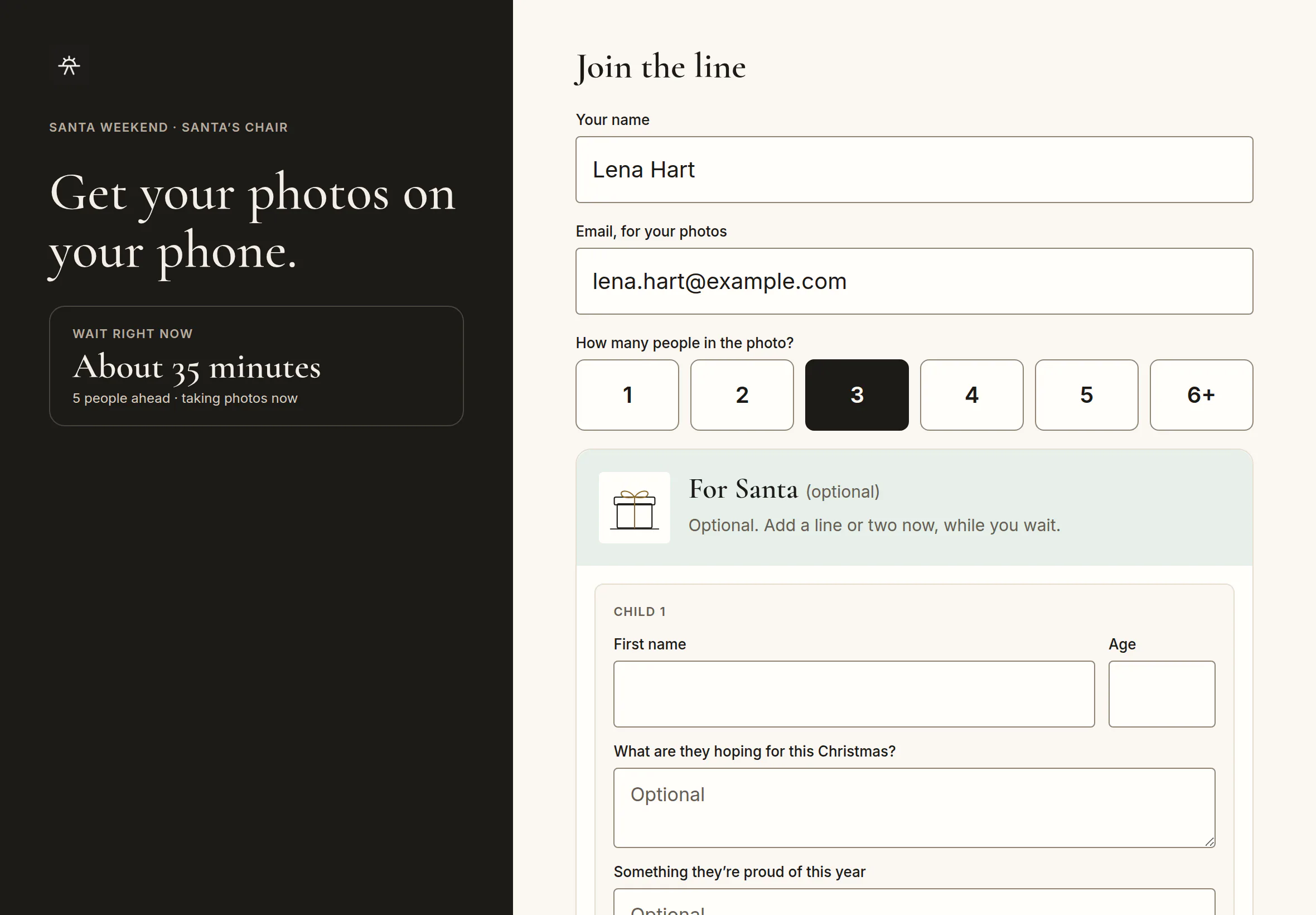
A family checking in on their own phone after scanning the QR code
Checked in · Jordan Ellis, party of 1
“You’re up next” texted · The Alvarez family
Deposit paid · The Alvarez family, 2:50 PM

Shoot tethered or straight to your card. Same workflow either way.

The Quick Gallery dashboard Home for Harper Lane Photography
The iPhone app’s Live screen
A family checking in on their own phone
“Up next” texted · Alvarez

Shoot tethered or straight to your card. Same workflow either way.

  • Tethered or card
  • Text alerts
  • Santa sessions
  • Fall minis
  • Holiday minis
  • School portraits
  • Corporate headshot days
  • Holiday parties
  • Booking and deposits
  • QR and iPad check-in
  • The live line
  • Lightroom Classic plugin
  • Your gallery host, or ours
  • Reports

Stop piecing together your own shoot-day system.

Pulling off a day of back-to-back sessions usually means building your own system: a booking form, a payment app, a spreadsheet, a clipboard for the line, and a memory card you sort by hand that night. Quick Gallery is that system, already built, so you can focus on giving every client the best possible experience.

1 of 4 · Before the shoot

Fill your time slots before the day starts.

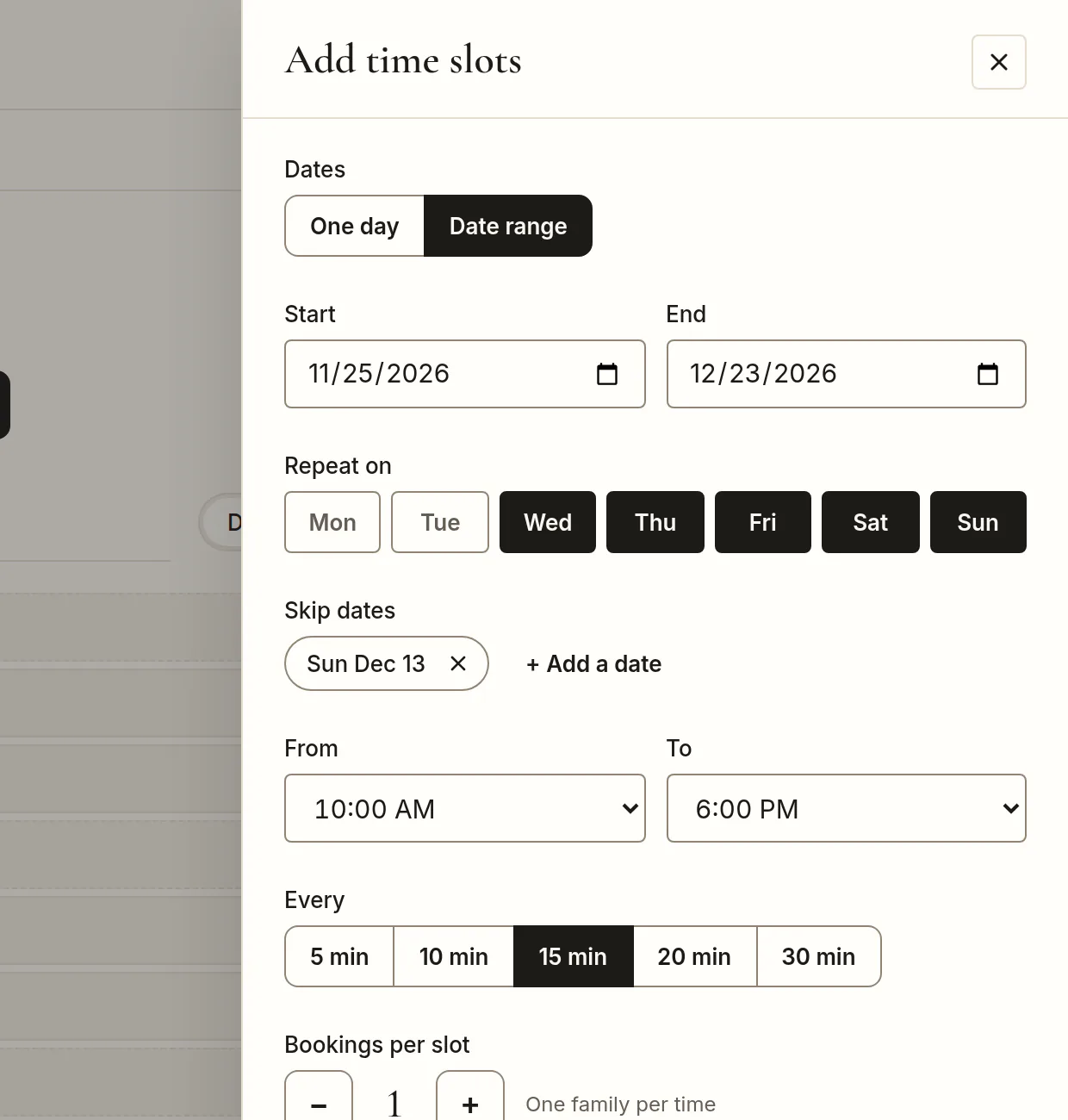
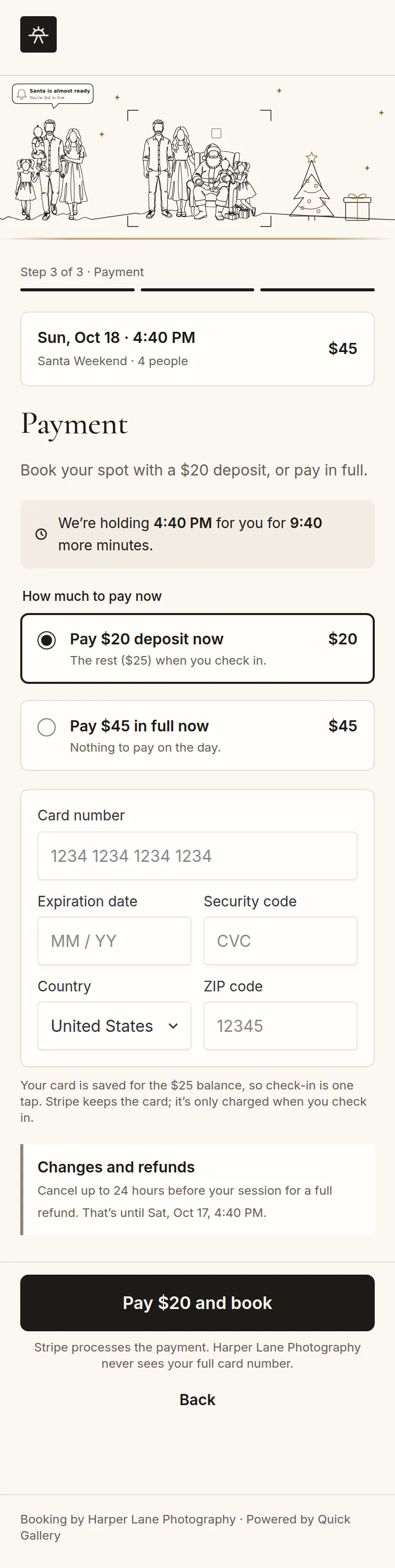
Add slots for one day or a date range, share one booking link or QR code, and families pick an open time. Take a deposit or the full price at booking, paid straight into your own Stripe account. Families get a confirmation and can change or cancel their time themselves.

  • Full times drop off the booking page automatically
  • Walk-ins still check in and fill the gaps
  • No additional fees on your client payments
Quick Gallery · Schedule · Add time slots
Adding time slots for a date range: Wednesday to Sunday, 10 AM to 6 PM, every 15 minutes
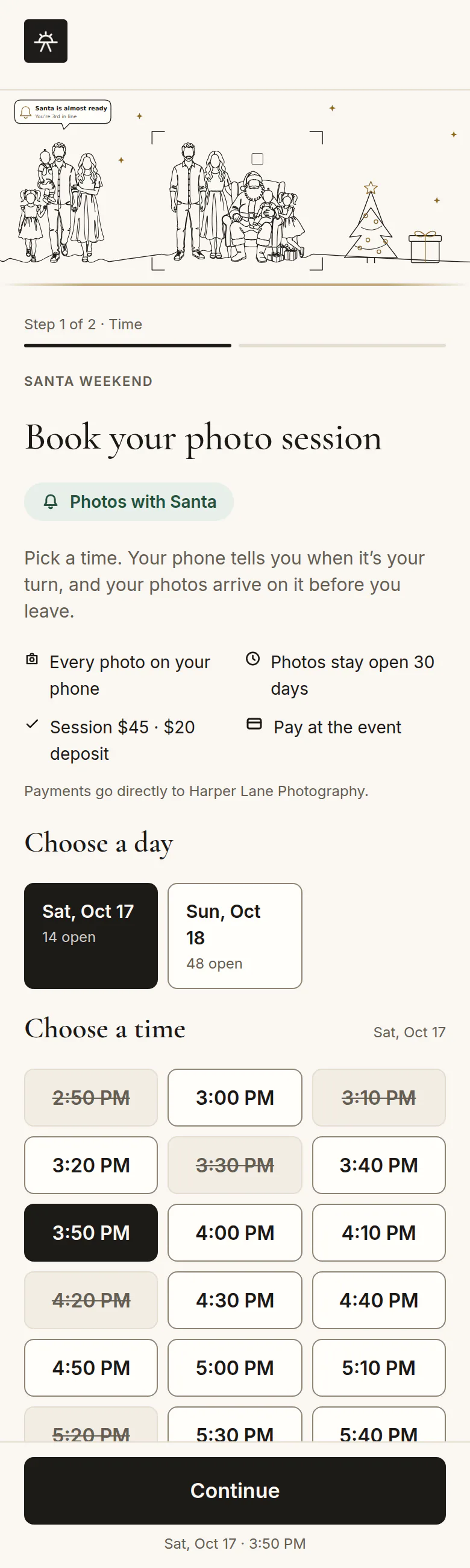
A family paying a deposit while booking a Santa time
No additional fees on your client paymentsDeposits and full payments go straight to your own Stripe account
2 of 4 · Shoot day

Know who’s next without shouting across the room.

Families check in by scanning a QR code or at an iPad kiosk. Your Live screen shows who you’re shooting, who’s up next and how long they’ve waited. Each family sees their place in line on their own phone and gets a “you’re up next” text and email when it’s almost their turn.

One family’s ten minutesSanta Weekend · Harper Lane Photography
  1. 2:31 PMChecks inScans the QR code, or taps in at the iPad kiosk
  2. 2:32 PMSees the line3rd in line, on their own phone
  3. 2:33 PMWaits anywhereKids play tic-tac-toe or trivia
  4. 2:38 PMGets a text“You’re up next,” plus an email
  5. 2:40 PMYou start the sessionEvery photo from here is theirs
Text alerts, built in

A text when it’s their turn.

Families can wait anywhere: grabbing a coffee, letting the kids play, or relaxing in the car. When they’re almost up, Quick Gallery texts them, with an email too, so nobody misses their session and you never have to call names across the room.

  • Sent automatically from the line, no typing
  • Nothing for families to download
  • 200 texts a month included with Pro
Your Live screen: the check-in switch, now shooting, and one Up next list with the line and later bookings
A family checking in at the iPad kiosk
An assistant running the line from the iPhone app, signed in to the same account
iPad kiosk at the door Your Live screen Your assistant’s second screen
Your Live screen: now shooting and up next
A family checking in at the iPad kiosk
An assistant running the line from a phone
Solo or with help

Shoot while an assistant runs check-in on the iPad and calls families up from a second screen signed in to your account.

  • Booked families move to the front when their time arrives
  • Tic-tac-toe, Connect Four and trivia for kids in line
  • Photos shot between sessions are held, never sent to the wrong family
2 of 4 · Shoot day
iPhone and Apple Watch · Included with Pro

Run the line from your pocket.

Check in walk-ins, start the next session, text a family to come on up and watch uploads, all from your phone.

  • Open the event, turn check-in on or off and end the day
  • See who’s walked in and who’s pre-booked, and mark families paid
  • Your Apple Watch shows who’s up next and starts the session
  • Hand a second iPhone to your assistant, signed in to the same account
Join the beta Comes with every account. Sign in with the same login as the web. Beta testers get it through TestFlight now, and it’s coming to the App Store.
The iPhone app’s Live tab in dark mode: now shooting and the line
The iPhone app’s Home screen on a shoot day: live now, the Today card and Open event
Tethered or not

Shoot tethered or straight to your card. Same workflow either way.

Tether if you want photos flowing to families while the event is still going. Or shoot to your card the way you always have. Quick Gallery notes when each session starts and ends, so after the shoot both paths land in the same place: one Lightroom collection per family, ready to edit and deliver.

Shoot tethered

Photos upload as you shoot. Send them to families live, or hold them until you’ve edited.

Live delivery if you want it

Shoot to your card

No cables at the set. Bring the card back after the session and import it like always.

Nothing new to carry
After the session, either way

The same sorted workflow.

  1. 1Session start and end times are already saved
  2. 2The Lightroom Classic plugin sorts by capture time
  3. 3One collection per family, ready to edit and deliver
3 of 4 · After the shoot

Open Lightroom to one collection per client.

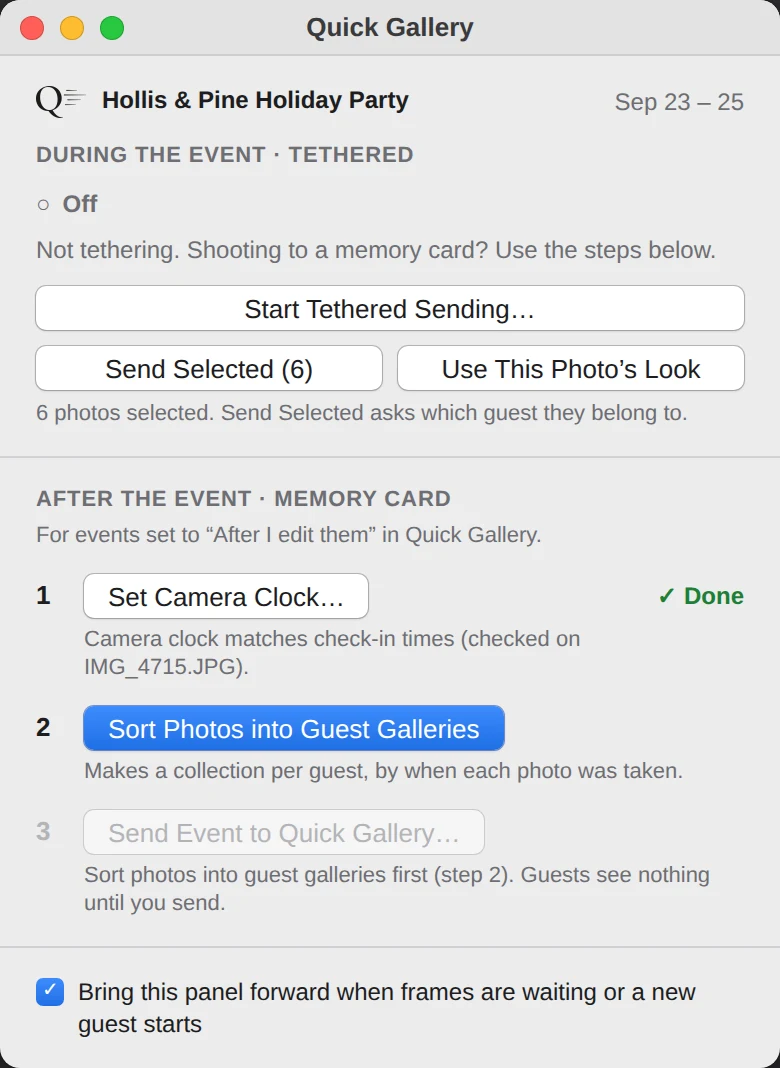
Every time you start and finish a session, Quick Gallery notes the time. After the shoot, our Lightroom Classic plugin matches each photo’s capture time to the right family and groups them into a collection per client. Anything it can’t place goes to Unsorted for you to drop in.

EOS_DIGITAL › DCIM › 100CANON
One card, one folder, 612 photos of 40 families. Before.
Camera clock2:34:07PM
Photograph the on-screen clock once.The camera said 2:31:52 PM. The plugin shifts every capture time by 2 min 15 s, so each photo lands with the right family.
  • Your files never move. Collections only.
  • Photograph the on-screen clock once and the plugin corrects your camera’s time
  • Shoot tethered or from the card. Both work.
The Quick Gallery panel in Lightroom Classic: step 2, Sort Photos into Guest Galleries
The Quick Gallery panel floats over Lightroom’s Library. Step 2 does the sorting.
4 of 4 · Delivery and numbers

Deliver where you already deliver.

Option 1 · the usual way

Your gallery host

Edit each client’s collection, then publish it to your gallery host with the host’s own Lightroom plugin.

Option 2 · faster

Quick Gallery galleries

Want it faster? Send private Quick Gallery galleries, one per family, or a shared event gallery anyone can open from a table QR code. Send them live as you shoot or after you edit.

A family’s private gallery on their phone
Optional tips
  1. 1Galleries stay open 1 to 30 days, your choice, then delete for good
  2. 2Families save full-resolution photos with no app or account
  3. 3Optional tips: families can add a tip at the bottom of their gallery
4 of 4 · Delivery and numbers

Know how the day went.

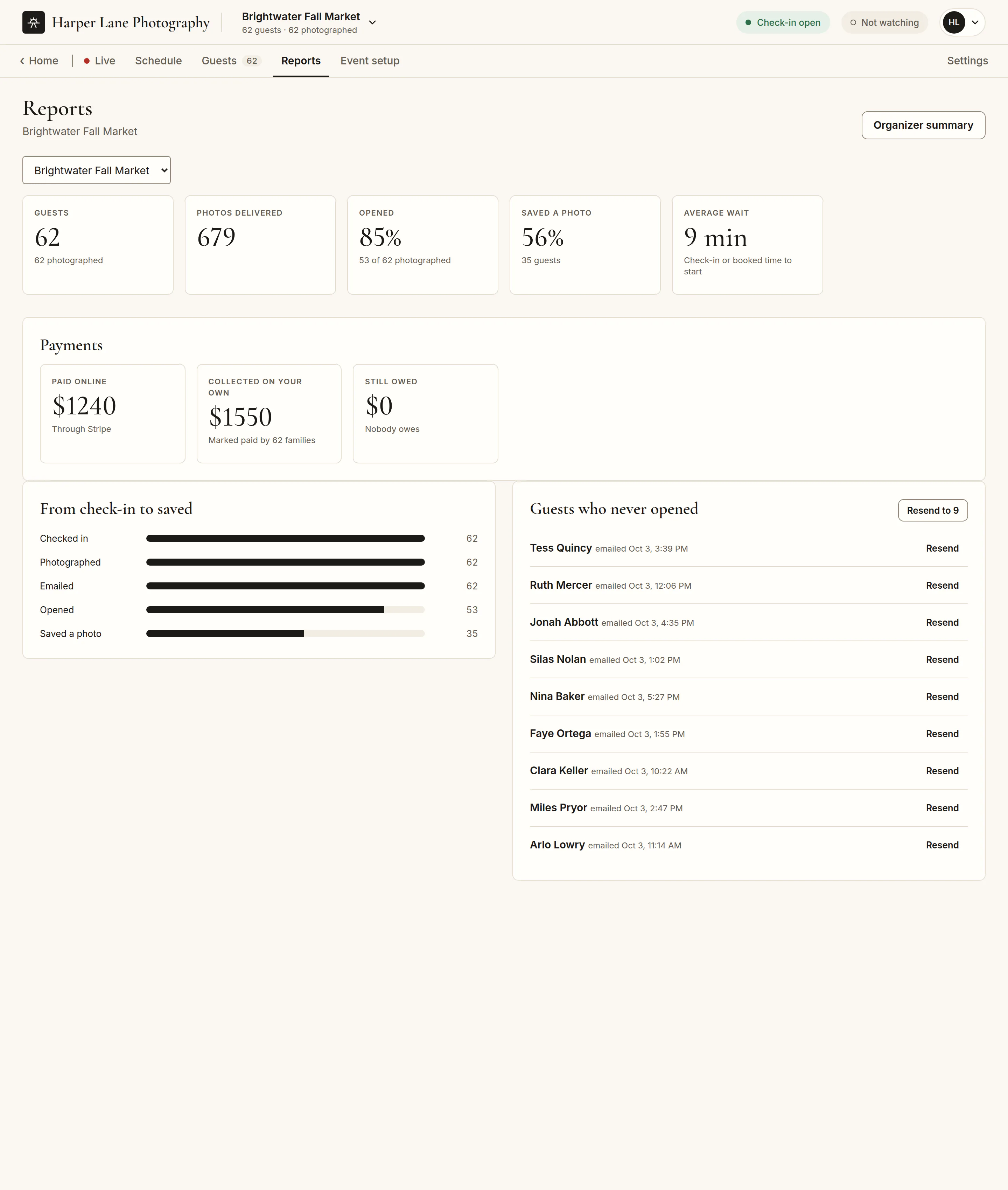
Most gallery hosts show you photos. Quick Gallery shows you the day. See guests photographed, average wait, deposits collected and balances due, and which galleries were opened and saved. Compare any date range to the one before, resend to anyone who hasn’t opened, and export it all to CSV.

62guests photographed
9minaverage wait
$1,240deposits collected
85%galleries opened
  • A one-page organizer summary for the venue or client who hired you
  • Every event, or your whole season at once
Quick Gallery · Reports
The report for Brightwater Fall Market: guests photographed, average wait, payments and galleries opened
Booking a Santa photo time with Harper Lane Photography
Santa and holiday sessions

A full Santa season, without the clipboard.

Weeks of booked slots, a line of excited kids, and hundreds of families to sort by name afterward. Quick Gallery was built by a photographer who runs Santa photos, for exactly that.

Weeks of booked slotsWalk-ins fill the gapsEvery family sorted by name
Pricing

One plan. Everything in it.

Pro

Free during the beta
$25/ month
$240/ year
or $240/year, two months free Two months free compared with monthly

Everything included.

  • Booking and time slots
  • Deposits and payments into your own Stripe, with no additional fees
  • Check-in and the live line
  • The Lightroom Classic plugin
  • The iPhone app
  • Private and shared galleries
  • Tips
  • Reports
  • 200 text alerts a month
Join the beta

Studio

Coming soon

Several photographers or stations at once under one studio.

Enter an email like you@yourstudio.com.

Thanks. We’ll keep you posted.Studio news goes to you@yourstudio.com. Nothing else.

We’ll only email you about this. Unsubscribe anytime. Privacy Policy

Need more texts? Add 200 for $10.
Off-season? Pause a monthly plan for up to 6 months. Your events, clients and settings stay.
Cancel anytime.
Questions

Good to know.

More answers in Help →
Do I have to stop using Pixieset, Pic-Time or ShootProof?

No. Quick Gallery sorts your photos into a Lightroom collection per client, and you publish to your host the way you do now.

Do I have to shoot tethered?

No. Shoot to your card and let the plugin sort afterward, or tether if you want live delivery.

Can my assistant help on shoot day?

Yes. They can run check-in on an iPad and the line from a second screen. Separate team logins come with the Studio plan.

Does it work with Capture One?

Capture One can export into Quick Gallery’s watch folder for live delivery. Sorting after the shoot is Lightroom Classic only for now.

What do my numbers include?

Bookings, wait times and payments for every event. Opens and saves count galleries sent through Quick Gallery.

How do families know when it’s their turn?

They get a text and an email when they’re almost up, and they can watch their place in line on their own phone. Pro includes 200 texts a month, and you can add 200 more for $10.

Can guests stop the texts?

Yes. Guests only get texts if they tick “Text me when it’s my turn (and a thank-you after)”, and they can reply STOP at any time. They’ll still see their place in line on their phone and get the email.

Do families need to download an app?

No. Families scan a QR code and everything happens in their phone’s browser: checking in, seeing their place in line, and saving their photos.

Is there an iPhone app?

Yes. Run the line, start and complete sessions, add walk-ins and check the weather from your iPhone. An Apple Watch app shows who’s up next and lets you start and complete sessions from your wrist.

Do you take a cut of client payments?

No. Deposits, session fees and tips go straight into your own Stripe account, and Quick Gallery takes no fee. Stripe’s standard processing fees apply.

What happens after the beta?

Beta testers get Pro free for 60 days, with no card. When it ends, you choose a plan to keep going. Nothing is charged automatically, and your events and settings stay.

Can I cancel or pause?

Yes. Cancel any time in Settings, and your plan runs to the end of the month or year you’ve paid for. Monthly plans can pause for up to 6 months. We don’t refund unused time.

How long are galleries kept?

You choose, from 1 to 30 days. Then the gallery closes and the photos are deleted for good.

Whose name do families see?

Yours. Your logo, studio name and social handles are on every booking page, gallery and email.

Your next mini-session day, run start to finish.

Enter an email like you@yourstudio.com.

Thanks. You’re on the list.We’ll email you@yourstudio.com when your spot opens.

We’ll only email you about the beta. Unsubscribe anytime. Privacy Policy

Free during the beta. Then $25/month, or $240/year.

$25/month, or $240/year. Cancel anytime.

The iPhone app’s Live screen